

If you’re running a cricket league, corporate tournament, or local sports event in India, you’ve probably seen how chaotic a traditional auction can get—paper sheets, manual calculations, budget confusion, and debates about who bid what. That’s exactly why more organisers are moving to a player auction app or full-feature cricket auction software to conduct a smooth, transparent cricket auction.
A player auction app is an online auction platform that manages player registration, live bidding, team budgets, and auction results in real time. It reduces disputes, improves transparency, and speeds up the entire process—making it ideal for first-time organisers and growing tournaments.
This beginner-friendly guide explains how a cricket auction app works, key features to look for, step-by-step setup, pricing expectations in India, and tips for organisers, players, and sponsors.
What is a Player Auction App and Why Do Leagues Use It
A player auction app is a digital system that runs auctions for sports leagues, especially cricket, using a structured, real-time bidding format. Think of it as an online bidding platform where teams compete to buy players within set budgets and rules.
Who typically uses it in India?
- Cricket league owners and organizers
- Sports academies conducting internal drafts/auctions
- Corporate offices running annual tournaments
- Local clubs and community events
- Brands/sponsors partnering with leagues
So, in short, we can say that a player auction app is an online auction platform that manages player registration, live bidding, team budgets, and auction results in real time, ideal for leagues that want a fair and transparent auction.
How Player Auctions Work (Beginner-Friendly Auction Flow)

Even if you’ve never conducted an auction, the flow is simple once you break it down. Most cricket auction software follows the same steps.
1) Pre-auction setup
Pre-auction set up like registration on the Players auction app prior to the auction day is important if you don’t want to face last minute hassle and error due to busy traffic on the players auction apps.
- The organiser creates the tournament/league. Here’s a Step-by-Step Guide: Setting Up Your First Digital Player Auction.
- Teams are added with owners/captains
- Rules are set (purse, squad size, increments, max players)
- Players register, and profiles get verified
2) Player grouping and categories
Grouping and putting players in categories are much need and helpful for the organizers and the league owners to select the desired players. Thus, Players are often grouped into buckets like:
- Batters, bowlers, all-rounders, wicketkeepers
- Capped vs uncapped (for bigger leagues)
- Local vs outstation/overseas (if applicable)
- Star players vs emerging players
Each player may have a base price, and bidding starts from there.
3) Auction day flow
Auction day flow is nothing but the day when auction takes place the live display of players on screen and auctioning in a proper flow without interruptions make it more desirable for the organizers. Because this is where the “auction cricket game” feeling comes in, but with proper control:
- Player nomination appears on screen
- Bidding starts from the base price
- Teams bid using set increments
- Player is “SOLD” or marked “UNSOLD”
- Team purse updates instantly
- The next player appears
4) Post-auction results
As much as the pre-auction setup is important so is the post auction setups like auction results, final list of players picked by teams etc. because once the cricket auction ends, organisers can typically:
- Finalize squads
- Export reports (PDF/Excel)
- Announce final team lists
- Share results on social media and WhatsApp
Tip: Running a short mock auction before the main event helps everyone understand the system, especially first-time team owners.
Key Features to Look for in a Player Auction App

Not every app is built the same. If you’re comparing a basic cricket auction app vs a more advanced online bidding platform, these are the features that matter most.
Must-have features
- Player registration form (online) with photo/document upload
- Admin approval/verification (avoid fake entries)
- Team creation + role-based access (organiser, auctioneer, team owners)
- Live bidding screen with real-time purse updates
- Auto rules & validation like bid increments, maximum players limit, minimum role required for players to take part in the auction and overseas/outstation caps.
- Auction logs/audit trail like who can bid, when and how much they can bid, also provide dispute proof bidding record.
- Export options like final squad list, unsold players list, budget summary and auction report for sponsors.
- Mobile-friendly UI Many Indian auctions happen in venues where owners rely on phone screens.
- Low-lag performance Stable real-time updates are critical
Along with these must-have features, some other features which can help in growing the player’s auction apps scope can be player stats and past performance cards, video links for highlights, team strategy view (role balance), sponsor branding space on screens/reports and multi-round auctions.
Step-by-Step: How to Use a Player Auction App (First-Time Setup)
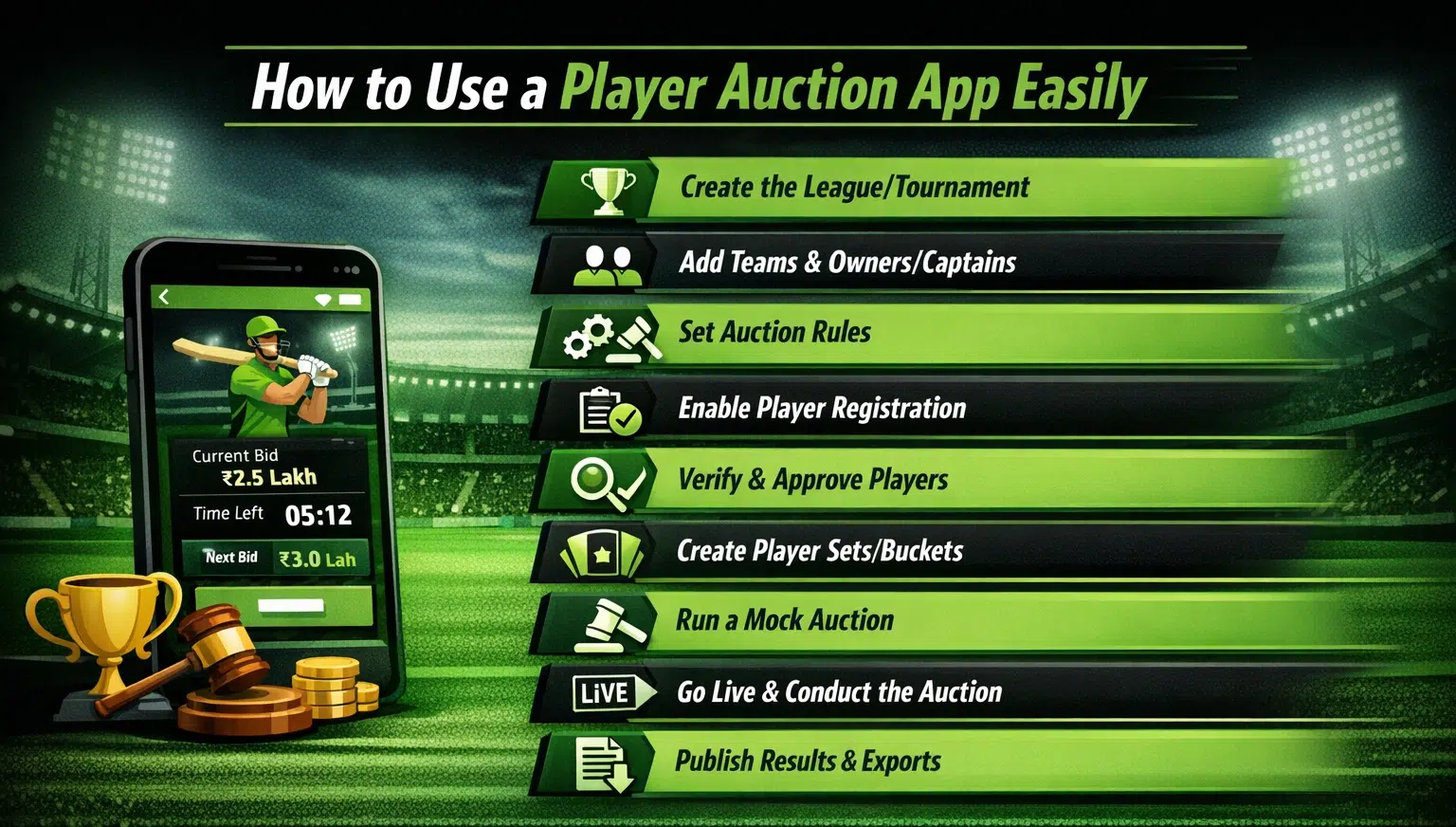
In case you have no prior knowledge about how to register on the players’ auction app, How to Create an Account on SquadXPro Player Auction App: Step-by-Step Guide will help you. Once the initial registration process is completed. If you’re wondering how to start, here’s a beginner-friendly setup flow that works for most leagues in India.
Step 1: Create the league/tournament
Creating a league or tournament is the most important step before starting the online auction of players via a players’ auction app. In case you have no prior understanding of the process, How to Create Your Player Auction with SquadXpro: Step-by-Step Guide will help you. Once the process of creating the league/tournament is done, add: tournament name, season (2026, 2027, etc.), sport format (T10/T20/OD or custom) and city and venue (useful for local branding).
Step 2: Add teams and owners/captains
Include: name and logo of the team, contact details of the team owner or captain and assigned budget and purse limit.
Step 3: Set auction rules
This is the backbone of a clean cricket auction: total purse per team, bid increments (example: ₹500 or ₹1,000), maximum squad size, minimum players per role (optional) and unsold player rules (relist later or move on).
Step 4: Enable player registration
Share your registration link via Instagram, corporate internal mailers, WhatsApp groups, and academic networks.
Step 5: Verify and approve players
Organisers should verify identity and contact details of players, along with their role in the team and availability for match dates. This prevents confusion and improves trust.
Step 6: Create player sets/buckets
Organise the auction into sets like:
Set 1 for top-order batters, Set 2 for fast bowlers, Set 3 for all-rounders, Set 4 for wicketkeepers and Set 5 for emerging/young talent. This keeps the auction structured and fair.
Step 7: Run a mock auction (highly recommended)
Before your main auction running a mock auction can save you from last minute hassle. Ensure proper internet connectivity, test screen display, test bidding increments and confirm that every team owner understands control.
Step 8: Go live and conduct the auction
During the live auction: keep a timer per player, announce “SOLD” clearly, ensure all bids are visible to everyone and keep backup internet ready.
Step 9: Publish results and exports
Once complete: export final squads, send each team their list and the remaining purse summary, post final squads on social media and share sponsor-branded auction recap.
This is where a professional online auction platform saves you hours.
Conclusion
A player auction app transforms the auction from a messy, manual event into a structured, transparent system. Whether you call it a cricket auction app, cricket auction software, or an online bidding platform, the benefits are the same: fewer errors, faster auctions, stronger trust, and professional results you can share instantly.